Foxy in your pocket, free to download
Bingo rooms, slots, Slingo and your daily Rewards Wheel spin, all in one app with the same account you use on the website.
- Free download, about 107 MB on iPhone
- Updated roughly once a month
- One account across app, mobile and desktop
18+. Download from the official App Store or Google Play only. Please gamble responsibly.
The Foxy Bingo app puts the whole site in your pocket: bingo rooms, slots, Slingo, the free daily Rewards Wheel and your account, all in one free download. It’s available on the App Store for iPhone and iPad and on Google Play for Android, and it’s one of the highest-rated bingo apps in the UK.
We installed the Foxy Bingo mobile app on both platforms to see how it compares with the website. It isn’t a cut-down version. The same account, balance and games carry across, and Foxy releases updates roughly once a month to keep it running smoothly.
If you’d rather not install anything, the mobile site in your browser does the same job. Below we cover how to download the app, what it offers, how it compares with the mobile and desktop sites, and how to fix the most common problems.
Foxy Bingo App at a Glance
Here are the key details from both app stores, as part of our Foxy Bingo app review:
| Detail | iPhone and iPad | Android |
|---|---|---|
| App name | Foxy Bingo™ Play Games, Slingo | Foxy Bingo™ Bingo Slingo Games |
| Rating | 4.7 out of 5 | 4.6 out of 5 |
| Number of ratings | 22,000+ | 13,500+ reviews |
| Downloads | Not shown | 100,000+ |
| Developer | Cashcade Ltd | ElectraWorks Limited |
| Size | 106.9 MB | Varies by device |
| Age rating | 18+ | PEGI 18 |
| Price | Free | Free |
Both developer names belong to Entain, the group that runs Foxy Bingo, so you’re getting the official app on either platform. On the App Store, the app also sits in the top 100 casino apps in the UK charts.
The ratings say a lot. Most gambling apps struggle to stay above 4 stars, and Foxy holds 4.6 to 4.7 across tens of thousands of reviews.
How to Download the Foxy Bingo App on iPhone and iPad
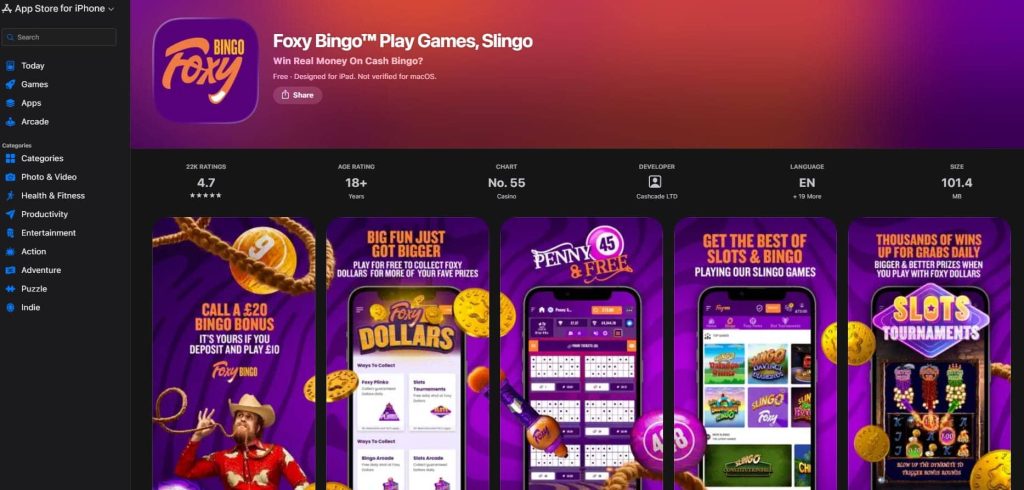
The Foxy Bingo app download on iOS works like any other App Store app:
- Open the App Store on your iPhone or iPad.
- Search for “Foxy Bingo”.
- Look for the purple Foxy icon and the name Foxy Bingo™ Play Games, Slingo.
- Tap Get and confirm with Face ID, Touch ID or your Apple ID password.
- Open the app and log in, or tap to create a new account.
The app takes up about 107 MB, so check you have some free storage before you start. It’s designed for both iPhone and iPad, and on a tablet the bingo cards and slot reels have more room.
Make sure you download the right app. Foxy has a sister app called Foxy Games, which focuses on slots and casino games. If you’re looking for the bingo rooms, check that the app name says Foxy Bingo.
The iOS app is updated regularly. Recent versions have arrived about once a month, and the latest came out this week. Turning on automatic updates in your iPhone settings keeps it current without any effort.
Foxy Bingo App for Android
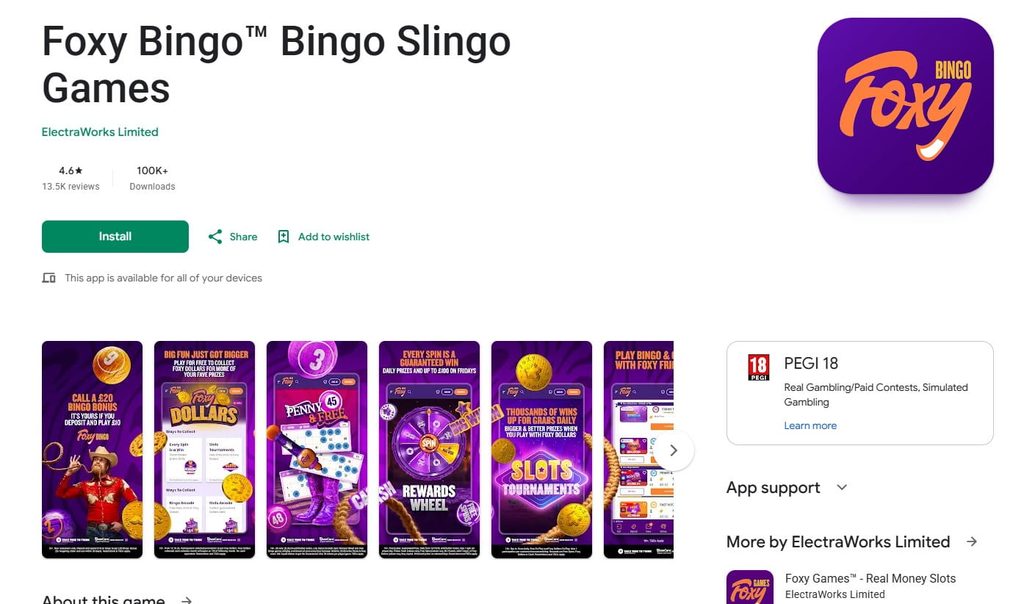
The Foxy Bingo app for Android is on Google Play, so there’s no APK file to download from a website and no security settings to change. Real-money gambling apps from licensed UK operators are allowed in the Play Store, and Foxy’s is one of them.
To install it:
- Open Google Play on your phone or tablet.
- Search for “Foxy Bingo”.
- Choose Foxy Bingo™ Bingo Slingo Games by ElectraWorks Limited.
- Tap Install and wait for the download to finish.
- Open the app and log in or register.
The Foxy Bingo app download is free, and there’s no charge for the app itself. You only spend money when you deposit to play. Google Play lists it as available for all your devices, so it works on Android tablets as well as phones.
With over 100,000 downloads and 13,500+ reviews averaging 4.6 stars, the Android version is just as popular as the iPhone one. Google Play lists the same publisher’s Foxy Games app alongside it, so it’s easy to tell the two apart.
Logging In and Managing Your Account in the App
Logging in to the app works the same way as on the website. Tap Log in, then enter your email address or User ID and your password. If you don’t have an account yet, you can register inside the app in the same three short steps as on desktop.
The “Keep me logged in” option is especially useful on a phone. Switch it on, and the app opens straight to your account each time.
Everything in your account is available from the app:
- deposits and withdrawals, including Apple Pay and Google Pay
- your balance, bonuses and wagering progress
- account history and personal details
- safer gambling tools such as deposit limits
Because the app uses the same account as the website, any change you make, such as a deposit or a new deposit limit, shows up instantly on desktop too.
Games and Features in the App
The app is built around the same lobby as the website, so playing Foxy Bingo mobile doesn’t mean fewer games. The App Store and Google Play listings highlight several features that work particularly well on a phone:
| Feature | What it does |
|---|---|
| Bingo rooms | 90-ball and 75-ball games, including penny and free rooms |
| Slots and Slingo | The full slots lobby, Slingo titles and Foxy exclusives |
| Rewards Wheel | A free daily spin with guaranteed prizes and bigger prizes on Fridays |
| Foxy Dollars | Collect them through daily games and spend them in the arcades |
| Slots tournaments | Free daily entries with Foxy Dollars prizes |
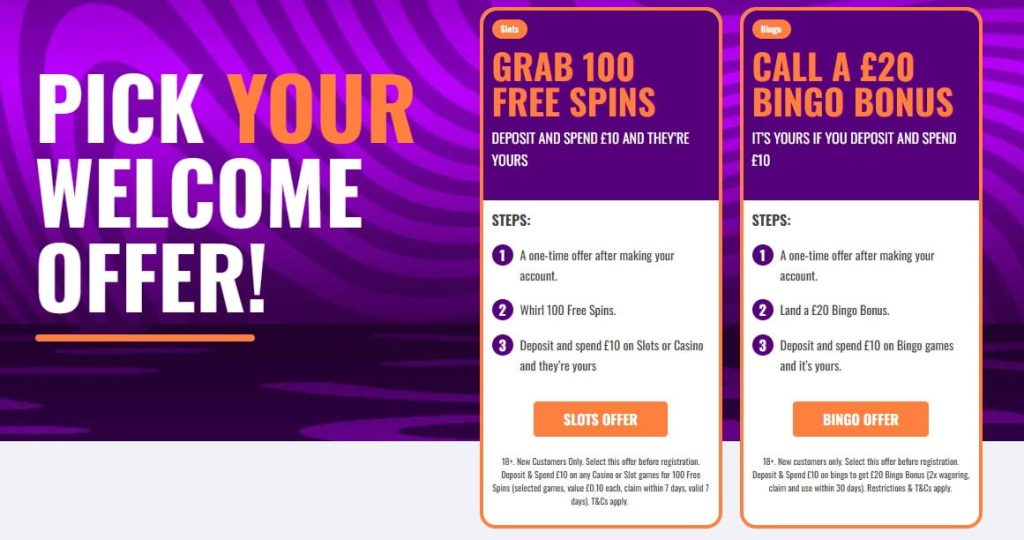
| Welcome offer | The £20 bingo bonus or 100 free spins for new players |
The Foxy Dollars hub shows every way to collect: the Rewards Wheel, slots tournaments, the Bingo Arcade and the Slots Arcade. Having them on one screen makes it easy to work through your daily freebies in a couple of minutes.
The app’s screenshots also show Penny and Free bingo prominently, which makes sense. Short, cheap bingo games suit a quick session on the bus or during a lunch break.
Slots load quickly and fit the screen in portrait or landscape. Live casino tables stream in good quality on a stable connection, though they use more data than bingo or slots.
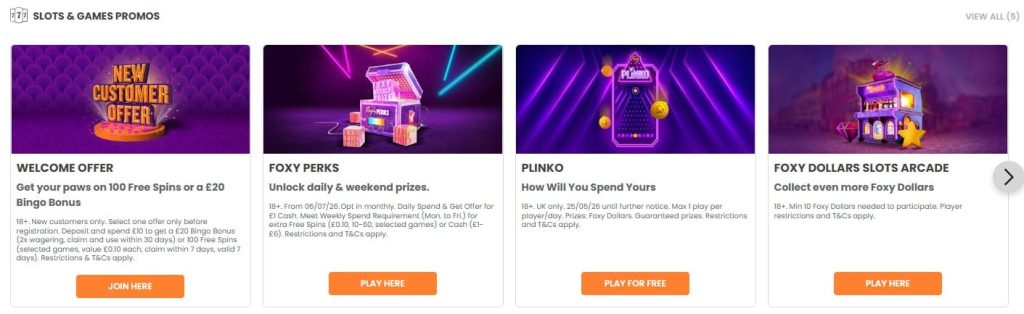
Bingo Rooms and Chat on Mobile
The bingo rooms are the heart of the app, and they’re laid out for small screens. Your tickets fill the main view, with the called numbers and the prize ladder at the top.
Auto-daub is the most useful feature on mobile. The app marks your numbers for you, so you don’t need to tap along with every call. Tickets are sorted automatically, with the ones closest to winning shown first.
The chat that makes bingo social on desktop is part of the mobile experience too. You can follow what’s happening in the room, join in with chat games and talk to the hosts without leaving your tickets. On a smaller screen, the chat opens as a panel you can slide in and out, so it doesn’t cover your cards.
Buying tickets for upcoming games is quick as well. You can pre-buy for later sessions, such as the evening promotions, and the app keeps them ready for when the game starts.
Foxy Bingo Mobile Site: Playing Without the App
You don’t have to install anything to play on your phone. The Foxy Bingo mobile site runs in Safari, Chrome or any modern browser, and it adjusts automatically to the size of your screen.
Playing Foxy Bingo on your mobile through the browser gives you:
- the same account, balance and bonuses as the app and desktop
- the full bingo, slots and Slingo lobbies
- deposits, withdrawals and account settings
- no storage used on your phone and no updates to install
The mobile site is a good choice if your phone is short on storage, or if you only play now and then. It’s also handy on a shared or work device, where you’d rather not leave an app installed.
For quicker access, you can add the site to your home screen. In Safari, tap Share and then Add to Home Screen. In Chrome, open the menu and choose Add to Home screen. The shortcut opens Foxy straight from your phone’s home screen, just like an app.
The trade-off is convenience. The Foxy Bingo mobile app opens faster and keeps you logged in more reliably, so regular players usually end up preferring it.
Switching to the Full Desktop Site
Some players prefer the layout they’re used to on a computer, which is why the Foxy Bingo non mobile site gets so many searches. On a phone or tablet, you can switch to it through your browser rather than through Foxy itself.
| Browser | How to request the desktop site |
|---|---|
| Safari (iPhone and iPad) | Tap the aA icon in the address bar, then Request Desktop Website |
| Chrome (Android and iPhone) | Open the three-dot menu and tick Desktop site |
| Samsung Internet | Open the menu and select Desktop version |
The Foxy Bingo desktop site will then load with the full computer layout. On a phone, this usually means smaller text and more scrolling, so it works best on a tablet.
To go back, repeat the same step. Most people find the mobile layout or the app easier on a small screen, but the Foxy Bingo full site is always one tap away if you want it.
App vs Mobile Site vs Desktop
All three ways of playing share one account, so the choice comes down to how and where you play:
| Feature | App | Mobile site | Desktop |
|---|---|---|---|
| Download needed | Yes, about 107 MB on iOS | No | No |
| Opening speed | Fastest | Depends on browser | Depends on connection |
| Stays logged in | Yes, with “Keep me logged in” | Depends on browser settings | Yes, with “Keep me logged in” |
| Screen space | Built for phones | Adapts to the screen | Largest view |
| Updates | Through the app store | Automatic | Automatic |
| Best for | Regular play on the go | Occasional play or shared devices | Long sessions with lots of tickets |
For most players, the app is the best everyday choice. It opens quickly, remembers your login, and puts the daily freebies like the Rewards Wheel within easy reach.
The desktop site still wins for long bingo sessions with lots of tickets, because the bigger screen shows more cards at once. The mobile site sits in between: no download, but without the speed of the app.
Fixing Common App Problems
Most app problems have a quick fix. These are the ones we see most often:
| Problem | What to try |
|---|---|
| App won’t open or crashes | Update to the latest version from the App Store or Google Play |
| Games load slowly | Switch from mobile data to Wi-Fi, or close other apps |
| Download won’t start | Free up storage, since the iOS app needs about 107 MB |
| Logged out repeatedly | Turn on “Keep me logged in” and keep the app updated |
| App looks wrong after an update | Delete and reinstall it; your account and balance aren’t affected |
Foxy releases updates regularly, so many issues disappear simply by updating. Reinstalling is also safe, because nothing is stored only on your phone. Everything is tied to your account.
If the Foxy Bingo app still won’t work, try the mobile site in your browser. If that works, the problem is with the app on your device. If the site doesn’t load either, the issue is likely on Foxy’s side, and live chat can confirm what’s happening.
Safer Gambling Tools in the App
Playing on a phone makes it easy to dip in and out, which is why the safer gambling tools matter just as much in the app. All of them can be set from your account in a few taps:
- deposit limits, daily, weekly or monthly
- time-outs for a short break
- reality checks that remind you how long you’ve been playing
- self-exclusion for longer breaks
Limits set in the app apply everywhere, including the website, because they’re tied to your account rather than your device. As a UK-licensed operator, Foxy also takes part in GamStop, the national self-exclusion scheme. Both app stores mark the app as 18+.
Our Verdict on the Foxy Bingo App
The Foxy Bingo app is one of the best bingo apps in the UK, and its 4.6 to 4.7 star ratings across more than 35,000 reviews back that up. It isn’t a lighter version of the website. It’s the full Foxy experience, built for a phone.
The highlights are the daily features. The Rewards Wheel, Foxy Dollars, free slots tournaments and penny bingo all fit perfectly into short mobile sessions. Regular updates keep it stable, and the shared account means you can switch between phone, tablet and computer whenever you like.
For players who don’t want another app, the mobile site is a solid alternative, and the desktop version is always available through your browser. Either way, Foxy works well wherever you play.
FAQ
Is there a Foxy Bingo app?
Yes. The official Foxy Bingo app is free on the App Store for iPhone and iPad and on Google Play for Android. It’s rated 4.7 on iOS and 4.6 on Android.
Is the Foxy Bingo app free to download?
Yes, the app is free on both platforms. You only spend money when you choose to deposit and play.
How big is the Foxy Bingo app?
The iOS app is about 107 MB. The Android size depends on your device, so make sure you have some free storage before downloading.
Do I need a separate account for the Foxy Bingo app?
No. The app uses the same account as the website, so your balance, bonuses and history are the same on every device.
Can I play Foxy Bingo on my mobile without the app?
Yes. The mobile site works in any modern browser with the same games and account. You can add it to your home screen for quick access.
How do I get the full Foxy Bingo site on my phone?
Use your browser’s desktop mode. In Safari, tap aA and choose Request Desktop Website. In Chrome, open the menu and tick Desktop site.
Is the Foxy Bingo app safe?
Yes. It’s the official app from Entain, published on the App Store and Google Play and licensed by the UK Gambling Commission. Always download it from the official stores.
Why is the Foxy Bingo app not working?
Most problems are fixed by updating the app, switching to Wi-Fi or freeing up storage. If it still won’t work, try reinstalling it or using the mobile site in your browser.